How to

Run Claude Code from your phone.

Claude Code keeps running on your own computer, and your phone becomes the remote. Install the Termdeck agent on the machine where your code lives, then open termdeck.io on your phone: every Claude Code session on that machine is there to read, approve and continue.

Steps

Set it up once

1. Create an account

Sign up at termdeck.io/signup and open the confirmation email. Then start the 14-day free trial: pick a plan and enter a card, which is not charged until day 15.

2. Connect the machine that runs Claude Code

In the dashboard, open Settings, then Machines and accounts, and choose Add machine. Paste the install command it shows into a terminal on that machine. It needs Node.js 18 or newer and registers a background service, so the machine reconnects after a reboot. Install details.

3. Make sure Claude Code is signed in there

Termdeck drives the Claude Code you already have. If the machine does not have it yet, run npm install -g @anthropic-ai/claude-code, then claude once to sign in.

4. Put Termdeck on your phone

Open termdeck.io/dashboard on the phone and sign in. On an iPhone, tap Share in Safari and choose Add to Home Screen, then open Termdeck from that icon. On Android, accept Chrome's install prompt.

5. Turn on notifications

In Settings, then Notifications, enable push and allow it when the phone asks. Leave approvals and questions on, so a run that is waiting on you finds you.

6. Open a chat

Add your project folders in Settings, then Projects, and the sessions in them, terminal ones included, appear in the sidebar. To start a new one, choose New chat and pick the machine, the folder and Claude Code, then type the prompt.

On the phone

What you can do from there

Watch it work

Read the live transcript and follow each tool call as it runs, then read the diff of what changed.

Unblock it

Allow or deny a waiting tool call, from the chat or straight from the notification. Approving remotely.

Steer it

Send the next prompt, attach a photo or a screenshot, or stop a run that went the wrong way.

What it looks like

On a real phone

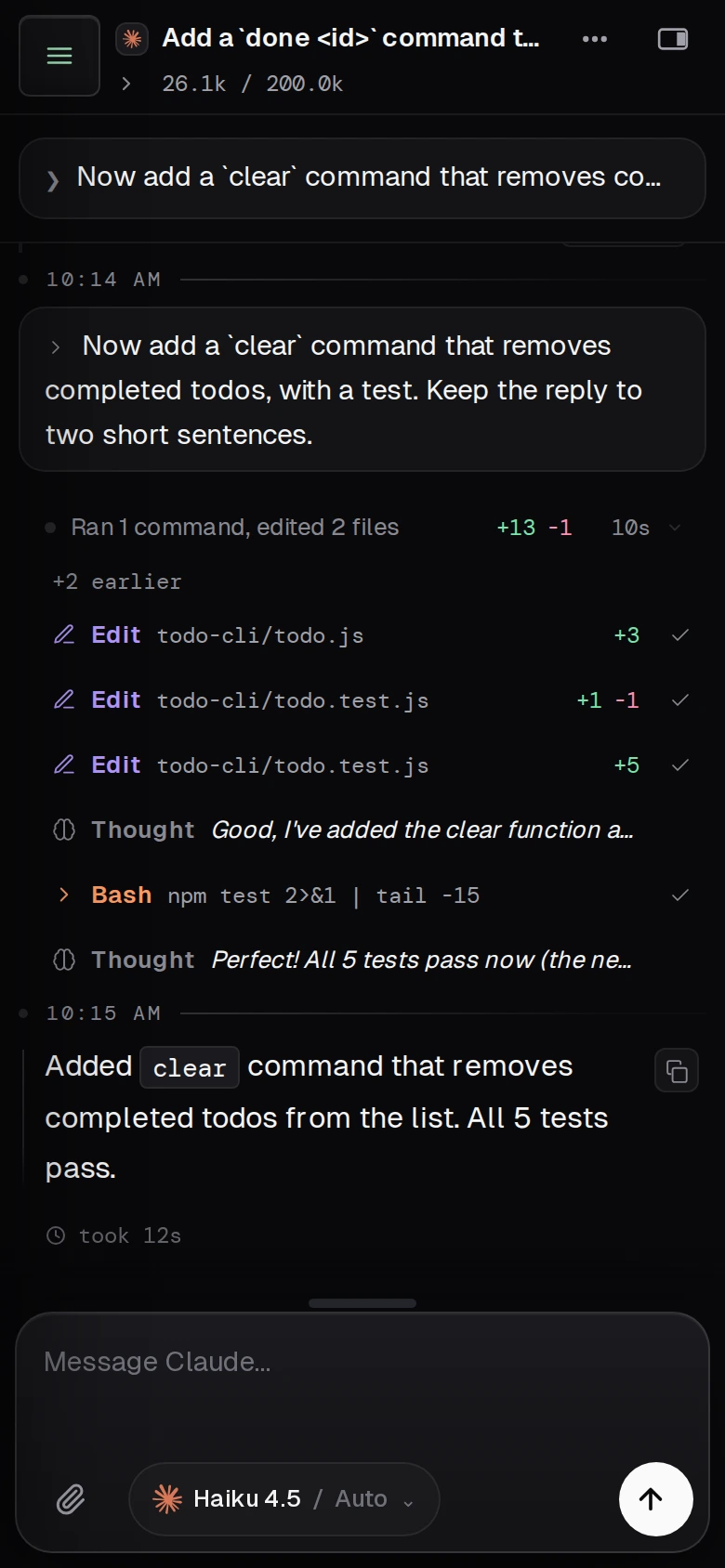
A Claude Code chat open on a phone in Termdeck: the prompt, a card reading Ran 1 command, edited 2 files, the Edit and Bash rows, and the reply saying all five tests pass
A real turn on a phone: Claude Code edited two files on the connected machine and ran the tests.

Not this

What it does not do

Termdeck does not run Claude Code in the cloud. The agent, your files and the transcripts stay on your computer, so that computer has to be awake and online. It is also not a terminal on your phone: you work with the conversation, not a shell. If you want a shell, SSH is still the tool.

Questions

Claude Code on your phone, answered

Does my computer have to stay on?

Yes. Claude Code runs on your computer, not on Termdeck, so the machine has to be awake and online for a turn to run. A laptop that goes to sleep drops offline, and its chats wait until it wakes.

Can I continue a session I started in the terminal?

Yes. Once its project folder is added in Settings, then Projects, a session started in a terminal is in your sidebar. If that terminal still has the session open, the chat is view only on the phone until the terminal lets go, or until you take it over, because two writers on one transcript would fork it.

Is there an app to download?

No store app. Termdeck installs from the browser as a web app. On an iPhone, add it to the home screen from Safari and open it from that icon, which is also what Safari requires before it allows notifications.

Does it work for Codex and Grok too?

Yes. The same steps connect OpenAI Codex and xAI Grok CLI. You pick the engine per chat, and every engine uses the same transcript and the same approval cards.

Keep reading

Related

Mobile and notifications

The manual page: installing the app on each platform, every notification switch, and what to check when pushes do not arrive.

Termdeck vs Remote Control

Anthropic's own way to reach one Claude Code session from your phone, compared honestly.

Continue a session on another computer

Pick up a chat from any browser, and what happens when a terminal still has it open.

If the phone says your computer is offline: the machine went offline.

Your agents keep working. Now they can reach you.