How to

Continue a Claude Code session on another computer.

The session stays on the machine where it started, and you pick it up from any browser. Install the Termdeck agent on that machine once, then open termdeck.io anywhere: the session is in your sidebar, ready to read and continue, and the terminal can resume it later.

Steps

From one desk to the next

1. Connect the machine the session is on

Sign up at termdeck.io/signup, then open Settings, then Machines and accounts, and choose Add machine. Paste the install command it shows into a terminal on the computer that runs Claude Code. Install details.

2. Open termdeck.io on the other computer

Sign in from any browser. Nothing needs installing there, and nothing is copied to it.

3. Find the session in the sidebar

Once its project folder is added in Settings, then Projects, the session is listed under that folder, terminal-started ones included, with no import step. Still missing? Check Settings, then Chats, where you choose whether terminal chats appear.

4. Send the next prompt

The turn runs on the original machine, in the original folder, and lands in the same session file. You can close the tab mid turn: the run keeps going and you catch up when you open it again.

5. If the composer is locked, take over

A terminal still holding the session makes the chat view only. Take over closes an idle terminal client, Force take over asks any holder to exit and interrupts a running turn, and Take over anyway only stops enforcing the lock, after you confirm the risk of a forked transcript.

6. Go back to the terminal whenever you like

On the original machine, claude --resume continues the same session, including the turns you sent from the browser. How resume works.

Two devices

The same chat open in two places

One drives, one watches

The device that opened the chat first drives. The other shows it live with the composer locked, and a row reads Also open on the other device.

Pass it across

Press Take over on the device in your hand to move the driving seat there. Nothing is closed and nothing is lost, so you can pass it back and forth.

Walk away

Close the driving tab or let that laptop sleep, and the chat hands itself to whatever is still open. No reload and no button press.

What it looks like

On a real phone

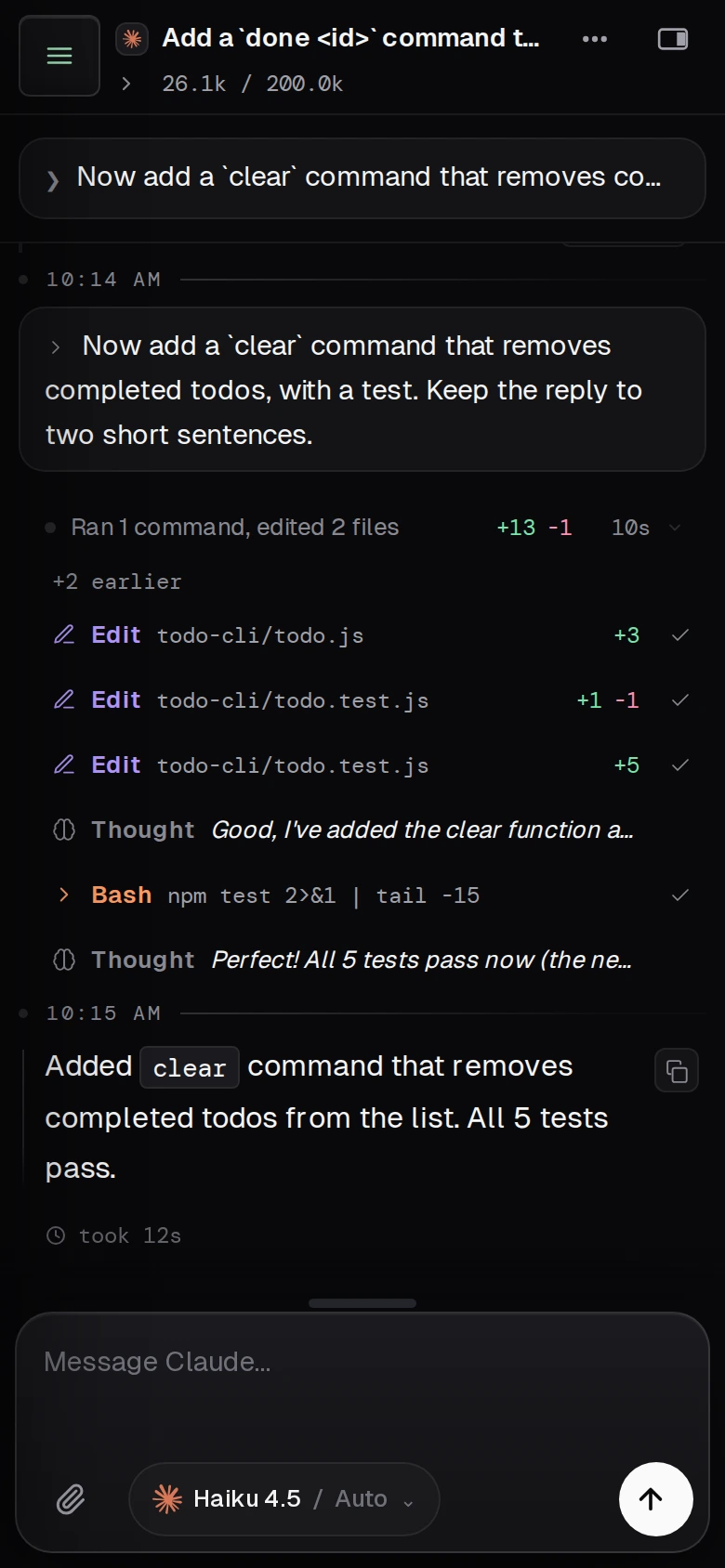
A Claude Code session continued from a phone: a follow-up prompt, the files it edited, the test run, and the reply
A follow-up turn sent from the browser. It ran on the machine where the session started, in the same session file.

Not this

What it does not do

Termdeck does not move or copy a session to a different machine. The transcript stays in its file on the computer that ran it, which has to be awake and online for a new turn to run. To run Claude Code itself on a second machine, you copy the transcript file across by hand, and from then on the two copies are separate sessions.

Questions

Continuing a session elsewhere, answered

Do I need to copy the session file to the other computer?

No. The session stays in its transcript file on the machine that ran it, and the other computer only needs a browser. You would copy the file only to run Claude Code itself on a second machine, and then the two copies go their separate ways.

Why is the chat read only?

Another process has the session open, usually a terminal running Claude Code on the same chat. Two writers on one transcript would fork it, so the composer stays locked until that process lets go, or until you take it over.

Does closing the tab stop the run?

No. Closing the tab, losing your connection or putting the laptop to sleep does not stop a turn. The agent keeps it running and replays what you missed when you come back. A run only ends when it finishes, when you stop it, or when nobody reconnects for several minutes.

Can I go back to the terminal afterwards?

Yes. Termdeck writes to the same session file Claude Code uses, so claude --resume picks the conversation up with every turn you sent from the browser.

Keep reading

Related

Chats and sessions

The manual page: starting chats, view only mode, every takeover option, and what happens while a turn runs.

Resume a Claude Code session

The terminal side: where the session id comes from and why resuming happens once, at process start.

Run Claude Code from your phone

The same idea on a small screen, with push notifications when a run needs you.

Your session stays put. You do not have to.