How to

Approve Claude Code permissions remotely.

When Claude Code stops to ask before running a command or changing a file, Termdeck puts that question on your phone and in every browser you are signed in to. Tap Allow once or Deny, from the chat or straight from the notification, and the run carries on without you walking back to the desk.

Steps

From a waiting prompt to a running agent

1. Connect the machine and your phone

Install the Termdeck agent on the machine that runs Claude Code, then open termdeck.io on your phone. Setting up the phone covers both.
2. Turn on approval notifications

In Settings, then Notifications, enable push and keep Approval requests switched on for this device. On an iPhone, do this from the home screen icon, not a Safari tab.

3. Read the card

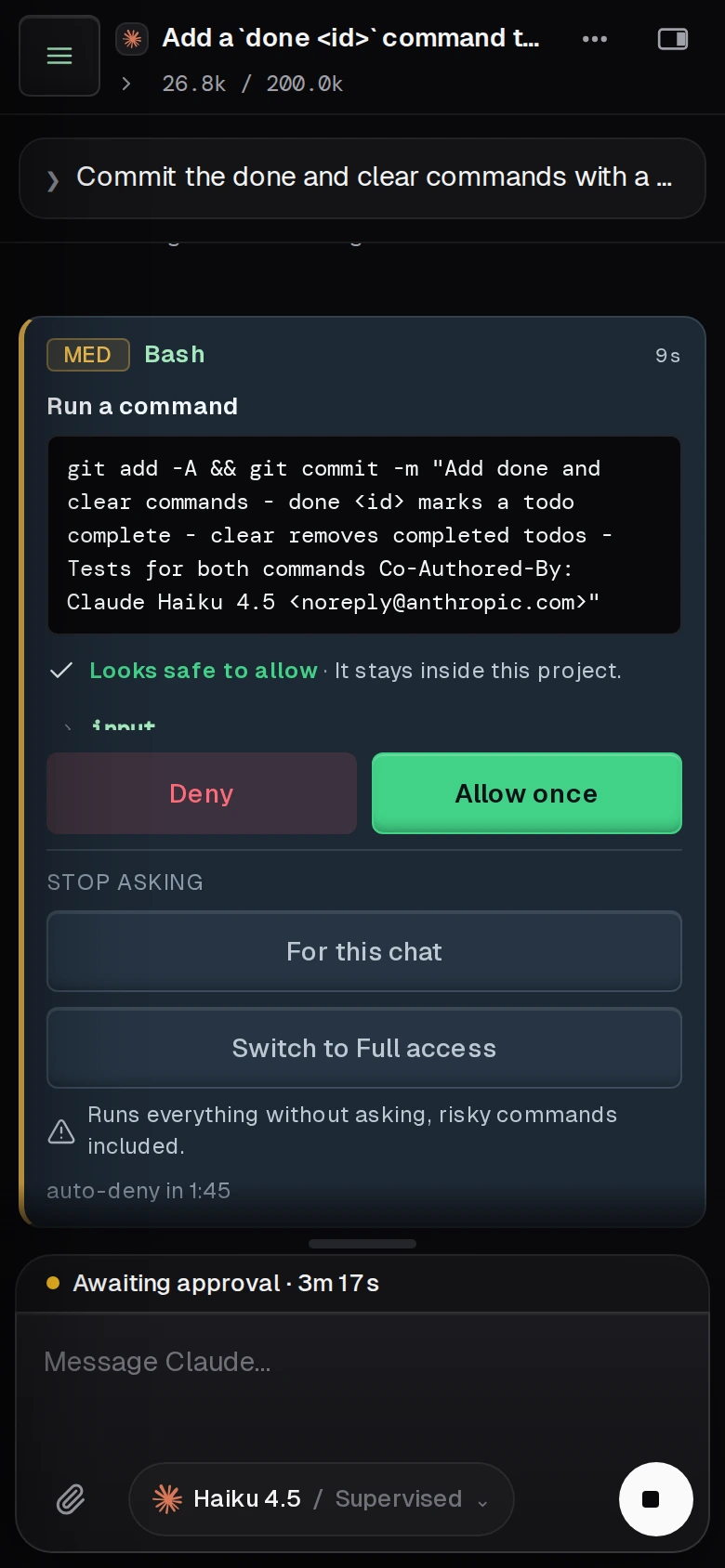
When a tool call needs you, it becomes a card in the transcript. It names the tool, a risk level, what the call is about to do in plain words, and the exact command or path it will use.

4. Answer it

Tap Allow once or Deny. Deny refuses that one call and the agent carries on with that answer. You can also answer from the notification itself, which carries Allow and Deny buttons.

5. Clear a backlog from one page

The bell in the sidebar counts what is waiting. The Approvals page lists every waiting request across every chat and every machine, and lets you answer several at once.

6. Stop being asked the same thing

On a card, For this chat allows that tool for the rest of the chat. Under Settings, then Approvals, you can save auto allow rules, such as npm test for Bash, capped at a risk level you choose.

Fewer prompts

Pick how often it asks

Supervised

Asks before every command and every file change. The mode for a repository you do not want touched by accident.

Accept edits

File changes go through and commands still ask, so your phone only buzzes for things that execute.

Rules on top

Auto allow rules clear routine calls, and notifications carry the ones worth interrupting you for. Every Claude Code mode.

Other engines

Codex and Grok approvals

OpenAI Codex and xAI Grok CLI chats use the same cards, the same Approvals page and the same notifications. The mode names are shared across all three engines, and where an engine behaves differently, the interface says so under the mode picker. In Supervised, for example, Grok refuses the call outright rather than asking.

What it looks like

On a real phone

A Termdeck approval card on a phone: a medium risk Bash command, git add and git commit with the full message, a Looks safe to allow verdict, Deny and Allow once buttons, and options to stop asking
A real prompt: Claude Code wants to commit, and the card shows the exact command, a risk level and a verdict before you choose.

Not this

What it does not do

Termdeck cannot forward a prompt your CLI never raises. If Claude Code is configured to bypass its own permission prompts, or a hook in your CLI settings answers them first, there is nothing to approve. It also does not let a rule or a tap get past the hard denies, such as reading SSH keys or running sudo: those are refused before you are asked.

Questions

Remote approvals, answered

What happens to the run while a prompt waits?

It stops at that tool call and nothing runs until you answer. The card shows how long the agent has been waiting and counts down five minutes; if nobody answers by then, the call is denied and the agent carries on with that answer.

Why does an old notification ask me to open the app?

Each approval notification carries a single use token that lasts 5 minutes, as long as the approval itself. By then an unanswered request has been denied and the agent has moved on, so open the chat to see what it did next.

Can a rule approve everything for me?

No. A rule never auto allows a critical request, a question or a plan, and it never overrides a hard deny. Those always reach you or are refused.

Is approving free?

It costs nothing extra. Approving or denying tool calls is unmetered on both plans, and notifications are included. Auto allow rules are on both Starter and Pro, including during the 14-day free trial.

Keep reading

Related

Approvals and permissions

The manual page: how risk is scored, every button on the card, rules, and the hard denies.

Claude Code permission modes

All five modes explained, and how they line up with Codex and Grok.

Run Claude Code from your phone

The setup this page builds on: the agent, the phone app and push.

A blocked run should find you, not wait for you.