How to

Use Claude Code and Codex in one UI.

Install both CLIs on your machine, connect it to Termdeck, and pick the engine each time you start a chat. Claude Code, OpenAI Codex and Grok then share one sidebar, one transcript view and one set of approval cards, so switching engine does not mean switching tools.

Steps

Set it up once

1. Install and sign in to each CLI

On the machine, run npm install -g @anthropic-ai/claude-code then claude, and npm install -g @openai/codex then codex login. Add Grok with npm install -g @vibe-kit/grok-cli and grok login if you use it. Each login opens a browser page with the provider.

2. Connect the machine

Create an account at termdeck.io/signup, open Settings, then Machines and accounts, choose Add machine, and paste the install command into a terminal on that machine. Install details.

3. Check both engines are signed in

The machine card lists Claude Code, Codex and Grok, each with its state. Signed in means it can run turns. Not installed or Not signed in tells you which command to run next.

4. Pick the engine per chat

Choose New chat and pick the machine, the folder and the engine, then send the prompt. Start a second chat on the other engine, in the same folder or another one, and both appear in the same sidebar.

5. Add a second account if you hit limits

In the machine's Claude or Codex panel, connect another login. When one account nears its limit, switch from the accounts panel and the next turn in the same chat runs under the other account. Accounts and rate limits.

Side by side

What stays the same across engines

One sidebar

Every chat from every engine sits under its project folder, including sessions you started in a terminal.

One approval surface

Live tool approvals work on all three engines, and permission modes share one set of names across engines, with per engine caveats printed under the picker.

One limits panel

The panel at the foot of the sidebar shows the live rate limit windows your provider reports for the account in use, for Claude, Codex and Grok alike.

Differences

Where the engines still differ

 Claude CodeCodexGrok
Live tool approvalsYesYesYes
Image attachmentsYesYesNo
Plan modeNativeNativeBehaves as read only
Checkpoint restoreYesNoNo
Saved account switchingYesYesUse the CLI
Terminal resumeYesYesYes

The full table, with attachments, slash commands and sub agent status, is on Install a coding CLI. Where an engine behaves differently, the interface says so under the picker.

What it looks like

On a real phone

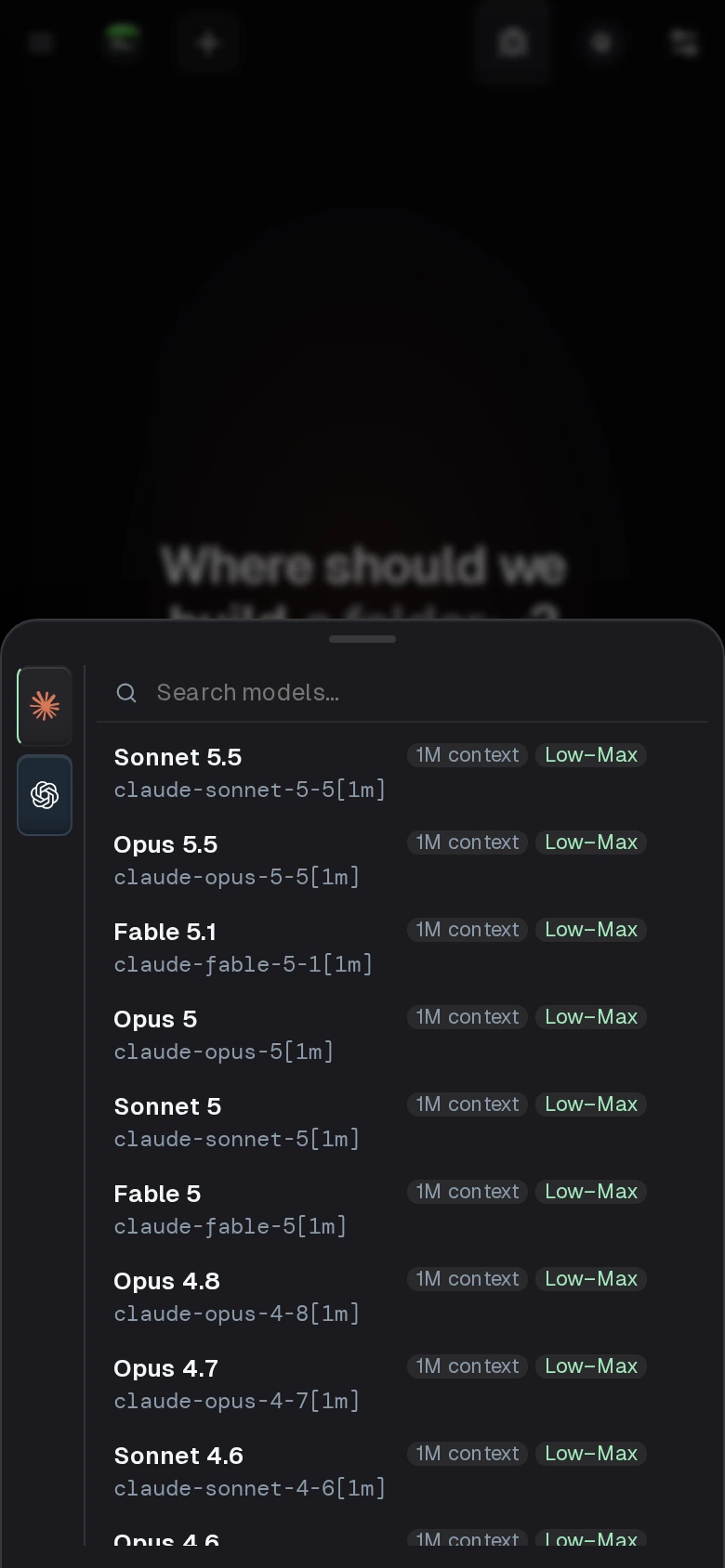
The Termdeck model picker on a phone, with an engine rail for Claude and OpenAI Codex beside the list of Claude models
The model picker on a new chat: the rail on the left switches engine, the list shows that engine's models.

Not this

What it does not do

Termdeck does not merge engines inside one conversation. A chat is a session belonging to one CLI, with that CLI's own transcript, so you run Claude and Codex in separate chats side by side. It also does not bring or resell the CLIs: each one runs unmodified on your machine under your own subscription, and needs its own install and login there.

Questions

Claude Code and Codex together, answered

Can Claude Code and Codex run at the same time?

Yes. A Claude chat, a Codex chat and a Grok chat can all run at once, on the same machine or on different ones. They are separate processes with separate transcripts.

Whose subscription pays for the turns?

Yours. Termdeck drives the official CLI, unmodified, under the plan each CLI is signed in to. It never asks for your provider password; each CLI keeps its own credentials on your machine.

Can I still resume these chats in a terminal?

Yes. Termdeck reads and writes the same session files the CLI does, so claude --resume and codex resume pick up chats you started in the browser, and terminal sessions show up in the sidebar.

Does every feature work on every engine?

Most do, and the interface prints a caveat under the picker where one does not. Checkpoint restore is Claude only, Grok takes no image attachments, and Grok has no saved account switching.

Keep reading

Related

Install a coding CLI

The manual page: installing each engine, confirming it is signed in, and the full table of where they differ.

A web UI for OpenAI Codex CLI

What Codex gains in a browser on its own, if Codex is the engine you mostly use.

Claude Code web UI alternatives

Seven ways to run Claude Code from a browser, compared on the same four questions.

How Codex asks before it acts: Codex CLI approval and sandbox modes.

Three engines, one place to drive them.