Guide · 16 August 2026

Claude Code web UI alternatives: I tried seven, then built the eighth.

Claude Code ships as a terminal CLI, so every web UI for it is somebody's third party idea of what the browser half should look like. I spent about a fortnight shopping before I gave up and wrote my own, which means I have opinions about this field and a conflict of interest to declare. Here is the honest version of both.

Start here

Four questions that sort the whole field

The bias first: I make one of these. Termdeck is number eight on this list and I wrote every line of it, so treat my ranking as an argument rather than a review. What I can offer instead of neutrality is that I actually needed the thing, tried the field with a real repo, and can tell you the exact point at which each one stopped helping me.

Second: almost everything here is good. There is no scam on this list, no wrapper with a pricing page bolted to it. They are simply answers to different questions, and most people who pick the wrong one picked it without asking these four.

Where does the code actually run?

On your machine, with your env vars, your local database and your MCP servers? Or in a clean cloud VM that clones a GitHub repo and hands back a branch? Both are legitimate. They are not substitutes for each other.

Can it see a session you started in the terminal?

Some tools only show runs they started themselves. If you live in the terminal and want the browser as a second window onto the same work, that single property decides everything else.

Who answers the permission prompt?

Claude Code stops and asks before it does anything real. The question is where you have to be standing when it does. A tool that cannot come and find you is a tool you have to sit next to.

How many machines, how many engines?

One repo on one Mac is a completely different product to a desktop, a Linux box and a work laptop running Claude Code, Codex and Grok between them.

01 · Anthropic

Claude Code on the web

The official answer, and the first one to try, because if you are on Pro or Max it is already included. You connect GitHub repositories at claude.ai, describe the job, and Anthropic runs it on their own infrastructure. Each task gets an isolated sandbox with network and filesystem restrictions, git goes through a proxy that can only reach the repos you authorised, and you can fire several tasks at once across different repos. Each one comes back as a branch and a pull request with a summary of what changed. It is in the iOS app too, as part of the same research preview.

For a well defined, sandboxable change this is the best tool on the page. "Add validation to this endpoint, write the test, open a PR" is exactly the shape it wants, and delegating three of those while you do something else is a genuinely good afternoon.

Where it stops is where your machine starts. The sandbox has no route to your local Postgres, your .env, the MCP servers you spent an evening configuring, or the half finished branch that has never been pushed anywhere. It is GitHub only. And it shows you the tasks you started there, which means the run currently going in your terminal does not exist as far as it is concerned. It is a delegation product. It was never trying to be a window onto your own computer.

Pick it when the work is a clean, self contained change to a GitHub repo and you would rather your laptop was not involved at all. Longer comparison: Claude Code on the web vs Claude Code + Termdeck.

02 · The IDE route

The VS Code extension, JetBrains, and Cursor

Not a web UI, and I am including it anyway, because a good share of the people searching for one actually want this. The VS Code extension and the JetBrains plugin are not stripped down wrappers: they drive the same engine as the CLI, share the same conversation history, respect the same CLAUDE.md, and use the same permission modes. What they add is everything a terminal is bad at, which is mostly reading. Diffs render in the editor's own diff viewer. You can @-mention a file with a line range. Your language server's diagnostics get handed to Claude without you copying anything. Because Cursor is a VS Code fork, the extension loads there too, as it does in the other forks.

If your complaint about Claude Code is "I cannot read these diffs in a terminal", install the extension and stop reading this post. You are finished in two minutes and it costs nothing.

Where it stops: it is a panel in an editor on one computer. Close the lid and the run is not somewhere else, it is over there. No phone, no fleet, nothing to glance at from the sofa, and no answer at all for the machine under your desk that does the heavy jobs.

Pick it when you are at your desk anyway and the missing piece is review, not reach.

03 · Melty Labs

Conductor

A Mac app for running a team of agents at once, each in its own git worktree. You point it at a repo, it clones locally, and every task gets a fresh isolated checkout in about ten seconds with its own branch, terminal, diff and review path. It drives Claude Code, Codex, Cursor and OpenCode, connects to GitHub and Linear, and the agent can open pull requests and answer review comments. It is free and you bring your own subscription. Engineers at Linear, Vercel, Notion and Stripe use it, which is the kind of sentence I normally distrust and in this case seems to be plainly true.

If the thing costing you time is five agents trampling each other in one checkout, Conductor is the sharpest tool here. Worktrees are the correct answer to that problem and it does them in one click instead of the four commands I usually fumble.

Where it stops: macOS only, and it is a desktop app. Everything happens on the Mac in front of you, so a Linux box under the desk is not part of the picture and neither is a train. It is an orchestrator for one machine, not a control plane for your machines.

Pick it when you run several agents at once on one Mac and the pain is branch and worktree juggling. See also: single agent tools vs a fleet board.

04 · Open source

Vibe Kanban

The board shaped one. Vibe Kanban puts your agents on a kanban board with To Do, In Progress, Review and Done, and supports well over ten of them: Claude Code, Codex, Gemini CLI, GitHub Copilot, Amp, Cursor, OpenCode, Droid, Qwen. The MCP server is the clever part, because a planning ticket can ask an agent to decompose the work and generate the downstream cards itself. It runs locally and you drive it from a browser tab, so of everything on this list it is the closest to a web UI that is not trying to be a chat window.

Worth knowing the history before you build a workflow on it: Bloop, the company behind it, announced a shutdown in April 2026. The project is Apache-2.0 and community maintained since, the hosted features were removed, and the architecture is now fully local. That is a real answer rather than a red flag, but you should hear it from a blog post and not from a 404.

Where it stops: it is one machine's local server, and the unit of work is a ticket rather than a conversation. Reaching it from a phone is a tunnel you build yourself, and nothing pages you when a card stalls on an approval.

Pick it when you think in tickets and want an agent to turn a plan into cards.

05 · Open source

Claude Code UI, now CloudCLI

The one most people mean when they type this search. siteboon's project, somewhere north of eight thousand GitHub stars, reads ~/.claude/projects, the same directory the CLI writes its sessions into, and serves them through a React front end over a WebSocket. That one design decision is why it can show you a session you started in a terminal, and it is the decision I respect most in this whole roundup. There is a file tree with syntax highlighting, a built in shell, a layout that survives a phone, and it drives Codex, Cursor CLI and OpenCode as well. Free, self hosted, with a hosted version if you would rather not.

Where it stops is the part that never makes it into a README: self hosting means you own the exposure. Getting to your laptop from a phone means a tunnel, a certificate and an authentication story, and "expose the thing that can run arbitrary shell commands on my machine to the open internet" is a sentence worth finishing slowly. Beyond that it is one machine at a time, and there are no push notifications, so you still have to be the one who goes and looks.

Pick it when you are comfortable self hosting, you want the source, and one machine is enough.

06 · Open source

Happy Coder

The privacy answer, and the best pure phone experience here. You start sessions with their happy wrapper instead of claude, and the session syncs to a real iOS and Android app and a web client. Everything is end to end encrypted with TweetNaCl, the same primitives Signal is built on, so the relay forwards ciphertext and cannot read your code even in principle. MIT licensed, free, and there is realtime voice, which sounds like a gimmick until you use it on a walk.

Where it stops: the wrapper is the catch. Sessions have to be started through happy, so the plain claude you fired in a terminal an hour ago is not in the app. And an app is not a fleet board. It is one conversation at a time, on a phone.

Pick it when phone access matters more than everything else and you want the encryption story to be one sentence long.

07 · Build it yourself

tmux, Tailscale, and a terminal in a browser tab

This is what I ran for a year, and it is a completely respectable answer. tmux keeps the session alive when the lid closes. Tailscale puts your machines on one private network without you touching a router. ttyd or code-server puts a terminal in a browser tab. Total cost nothing, total vendor risk nothing, and every piece is software that will outlive all of us.

Where it stops, and I say this with love, is everywhere. tmux has no notion of a notification. It will hold a finished run in a detached session for six hours and never say a word. A permission prompt on a phone sized terminal is eighteen columns of wrapped text. A diff is ransom mail. And you now maintain a small piece of infrastructure whose worst day is you debugging your own VPN config on a Sunday instead of the bug you sat down to fix.

I can date the exact minute this stopped being funny. I started a refactor on the Linux box, walked away for an hour, and came back to find the agent had spent fifty eight of those sixty minutes sitting on a permission prompt, waiting for a keystroke I was never going to see, because the window was behind a browser on a different machine.

Pick it when you are already fluent in all three parts and genuinely do not want a product. More on this one: tmux for AI agents.

08 · Mine

Termdeck

So, the conflict of interest. Termdeck is the browser and phone front end for the CLIs you already have, Claude Code, Codex and Grok, running on the machines you already own. It does not host a model, it does not want your API key, and it never proxies your code anywhere.

The decision that matters is the same one CloudCLI made, and I would defend it to the death: the CLI's own session file on disk is the source of truth, and Termdeck renders that file. So a chat you started in a terminal appears in the browser (there is a group on the board called, literally, "open in a terminal"), a chat you started in the browser reopens in your terminal with claude --resume, and the second another process starts driving a session Termdeck locks that composer to view only, because I once typed into both ends of the same conversation and forked its history in half, which is as unpleasant to untangle as it sounds.

The rest is the fleet. Every machine on one board, sessions grouped by whether they need you. Push notifications fired from the machine itself, so an approval reaches your phone with no browser open anywhere and you can allow, deny or take the run over from wherever you are standing. Diffs docked next to the conversation that produced them. A usage ledger across every account and model. One click switching between two Claude subscriptions when the first one hits its limit, mid chat, without losing context. The agent dials out over an ordinary WebSocket, so there is no inbound port, no forwarding rule and no VPN, which is the whole reason I stopped maintaining one.

Honest limits, since I am the one keeping score. It is not an IDE and does not want to be; if you want to write code by hand, go and write it by hand. Every machine needs a small agent installed, which is one command but it is still one command. And the free plan is one connected machine, one session at a time and 30 browser turns a month, which is plenty for watching and approving and not enough to work from the browser all day. Paid starts at $9.99. Every new account gets 14 days of Pro first, with no card.

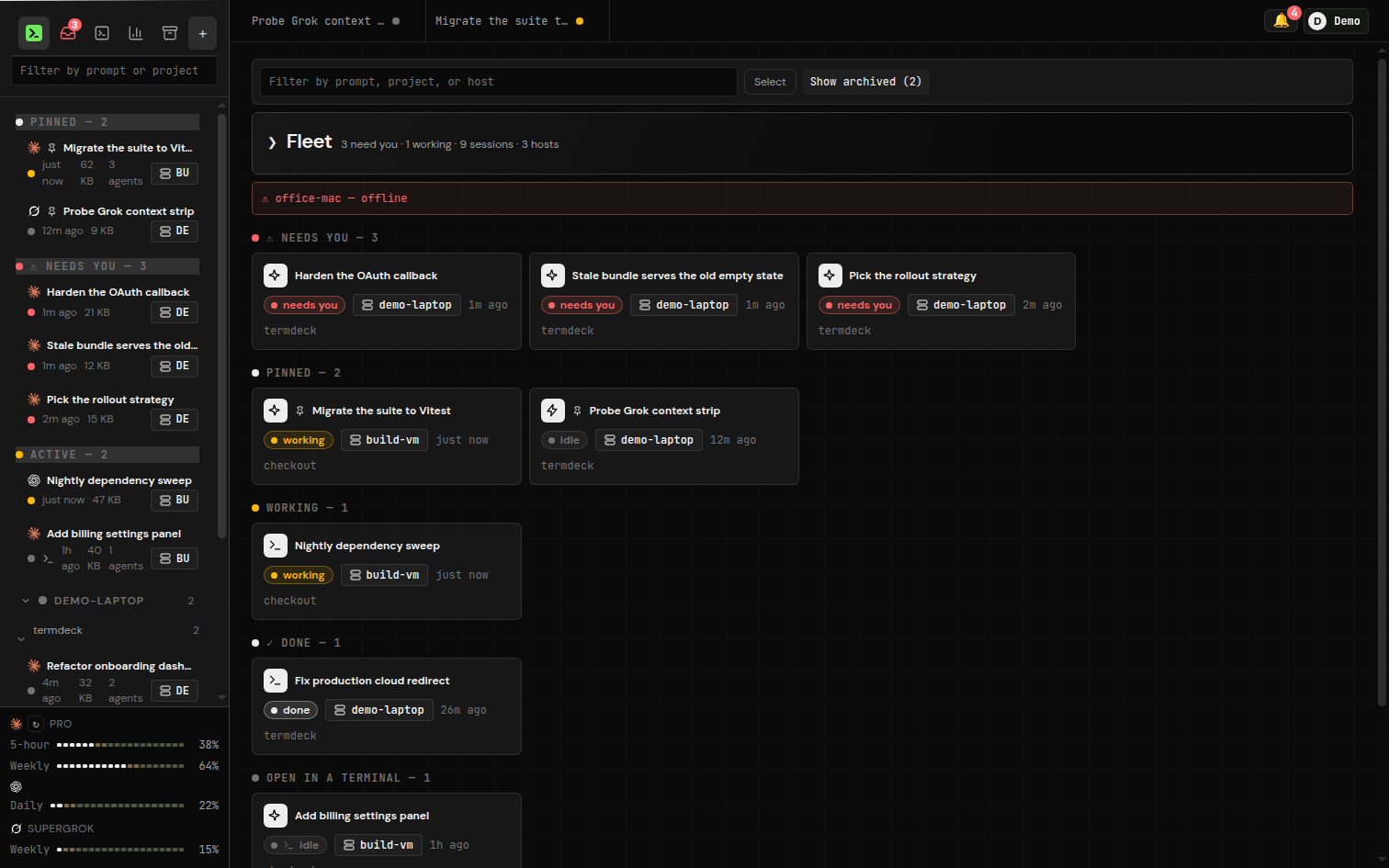
The Termdeck fleet board grouping sessions by status: three that need you, two pinned, one working, one done, and one open in a terminal, across the demo-laptop and build-vm machines, with per account rate limit meters in the sidebar.
The board groups by what is waiting on you, not by project. The last group is sessions a terminal is currently driving: readable here, view only, still yours in the terminal.

Pick it when you have more than one machine, more than one engine, or the thing that keeps costing you time is not being there at the moment the agent asks.

Compare

All eight, on the four questions

 Runs onSees terminal-started sessionsApprovals on your phoneMachines at once
Claude Code on the webAnthropic cloud sandboxNo, only tasks started thereWeb + iOS, sandboxed auto-runNot applicable
VS Code / JetBrains / CursorYour machineYes, shared historyNoOne, at that keyboard
ConductorYour MacIts own worktreesNoOne Mac
Vibe KanbanYour machine, local browserIts own tasksNoOne
Claude Code UI / CloudCLIYour machine, self-hostedYes, reads the CLI's own filesIn a browser, if you expose itOne
Happy CoderYour machine, via its wrapperOnly ones started with happyYes, native appsOne at a time
tmux + Tailscale + ttydYour machinesYes, it is the terminalNo, nothing can page youAny, once you wire it
TermdeckYour machinesYes, renders the CLI's own filesYes, installable app + pushEvery connected machine

Claude Code on the web is a research preview for Pro, Max, Team and Enterprise plans. Details for the open source projects come from their own repositories and docs in August 2026, and all of them move quickly, so check before you commit a weekend to one.

The short version

What I would actually tell a friend

If the job is a clean GitHub task, use Anthropic's own Claude Code on the web. It is included in your plan, it runs somewhere safe, and it hands you a pull request. Nothing on this list beats it at that.

If you are always at your desk, install the VS Code or JetBrains extension. Two minutes, free, and it fixes the only real complaint most people have about the CLI.

If you run five agents on one Mac, use Conductor. Worktrees per task is the right idea and it is the best implementation of it.

If you want the source and one machine is enough, self host Claude Code UI. It reads the CLI's own session files, which is the property that makes a browser UI trustworthy.

If you only care about the phone, use Happy Coder. End to end encrypted, free, and the app is genuinely nice.

If you have a desktop, a Linux box and a work laptop, and the recurring cost in your week is agents quietly waiting on you while you are in a different room, that is the thing I built Termdeck for, and I did not build it because I spotted a market. I built it because I lost that fight badly enough to write software about it.

FAQ

Claude Code web UI alternatives, answered

What is the best Claude Code web UI alternative?

There is no single best one, because they solve two different problems. If you want to hand a self-contained job to a cloud machine and get a pull request back, Anthropic's own Claude Code on the web is the best tool for that and it is included in your plan. If you want a browser window onto the Claude Code already running on your own machines, the real choices are Termdeck, Claude Code UI, and Happy Coder.

Is there a free Claude Code web UI?

Yes, several. Claude Code UI and Happy Coder are open source and free to self-host, Vibe Kanban is Apache-2.0, and Conductor is free with your own subscription. Termdeck has a free plan with one connected machine, one session at a time, and 30 browser turns a month, and every new account starts on 14 days of Pro with no card.

Do these tools need an Anthropic API key?

No. Every tool on this list drives the Claude Code CLI that is already installed and signed in on your machine, so the work bills to the Claude subscription you already pay for. None of them host the model, and none of them need an API key on top.

Will a web UI break claude --resume in my terminal?

It depends on where the tool keeps its history. Anything that invents its own database gives you a second, divergent transcript. Termdeck reads and writes the CLI's own session file on disk, so a chat you start in the browser reopens in your terminal with claude --resume, and a chat you start in the terminal shows up in the browser.

Can I approve Claude Code permission prompts from my phone?

This is the question that separates the field. Most browser UIs show you the prompt only while you are looking at the tab. Termdeck installs as a home screen app and pushes the approval from the machine itself, so you can allow, deny, or take over the run without a browser open anywhere.

100+ engineers at five companies that asked not to be named. Their managers watch the spend.

Try the eighth one.

Connect a machine, open any browser, and drive the Claude Code you already have. 14 days of Pro, no card, then a free plan that never expires.