Product update · 23 July 2026

Switch Claude accounts without losing your sessions.

Termdeck now keeps more than one Claude login on a machine, and you can move between them in a single click. Your chats, projects, and approvals stay exactly where they are. It works on your own machine and on Termdeck Cloud.

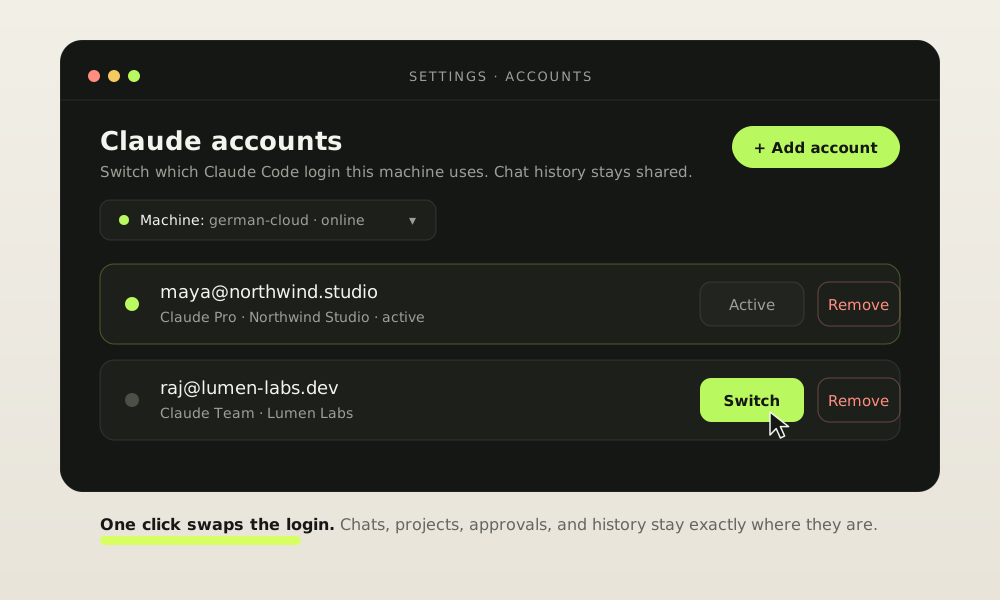
The Termdeck Accounts panel showing two saved Claude logins. maya@northwind.studio is active and raj@lumen-labs.dev has a Switch button next to it.
Settings, then Accounts. The active login is marked, and every other saved account gets a Switch button. The machine picker at the top appears once you have more than one machine connected. Accounts shown here are examples.

The problem

One machine, one login

A Claude Code install holds one login at a time. Plenty of people have two. There is a personal account for side projects, and a work account on a team plan. Moving between them meant signing out and signing back in, every time.

That is slow, and it is easy to get wrong. You start a run, then notice halfway through that it is billing the wrong account. Termdeck inherited this limit, because Termdeck reads the same login the CLI does.

What changed

Save your accounts once, then switch

You can now save several Claude accounts in Termdeck and move between them from Settings. Adding an account runs the real Claude sign in flow, so nothing is faked and no password is stored. Once an account is saved it stays saved, and switching to it takes one click.

  1. Open Settings, then Accounts.
  2. Click Add account. Termdeck starts the normal Claude sign in, hands you a link, and you paste the code back.
  3. Pick the machine if you have more than one, then click Switch.

The account you were on is saved automatically before every switch, so going back is also one click.

Under the hood

What actually moves, and what does not

A switch swaps two things. It swaps your saved tokens, and it swaps the identity record the CLI reads to know who you are. That is the whole change.

Everything else lives somewhere else on disk, so it is shared across accounts and it does not move. Your session history stays. Your projects stay. Your settings stay. An old chat still opens after a switch, and you can carry on in it as if nothing happened.

Safety

Why "without any issues" is a claim we can make

It saves the account you leave

Before every switch, Termdeck snapshots the login you are currently on. You never have to sign back in just to get back.

It checks the switch landed

After the swap, Termdeck asks the CLI who it is now. If the answer is not the account you asked for, it puts the old files straight back.

It refuses a dead login

If a saved account has already expired, Termdeck blocks the switch. A broken login never gets to replace a working one.

Tokens stay on your machine

On Cloud the swap runs on your own agent. The Termdeck relay passes the request along and never stores your Claude tokens.

Saved files are locked down

Each saved account is written to your home directory with owner only permissions, and written atomically so a crash cannot leave half a file.

Per machine, by design

A login belongs to the machine that runs the agent, so each machine keeps its own accounts. Switching one never disturbs another.

On Cloud

The same panel, for every machine you own

Termdeck Cloud gets the same Accounts panel as the local app. If you have more than one machine connected, a picker appears at the top and you choose which machine to act on. Save an account there, switch it, or remove it, all from the browser.

The work itself happens on your machine. The browser asks the relay, the relay asks your agent, and your agent does the swap locally. That is why your tokens never sit on our servers.

FAQ

Account switching, answered

Will I lose my chat history?

No. History, projects, and settings are stored separately from your login, so they are shared across accounts. Open an old chat after switching and carry on in it.

Can I keep a personal and a work account together?

Yes. Save both, then move between them in one click. That is the main reason this exists.

Do you store my password?

No. Sign in goes through Claude's own flow. You approve it there, and Termdeck only keeps the resulting tokens, on your machine.

What if a saved account has expired?

Termdeck spots it before touching anything and refuses the switch. Your working login is left alone. Remove the stale entry and add the account again.

Does this work with Codex and Grok too?

Account switching covers Claude logins today. See the Codex and Grok pages for how those engines run in Termdeck.

Can I still use the terminal?

Yes. Termdeck reads the same files the CLI does, so a switch made in the browser is the login your terminal sees next time you run claude.

Get started

Two accounts, one click.

Open Settings, then Accounts, and add your second Claude login. It takes about a minute, and you only do it once.